사전조건
Terraform 설치는 아래 링크를 참조합니다.
https://developer.hashicorp.com/terraform/install
Azure Cli 설치는 아래 링크를 참조합니다.
https://learn.microsoft.com/ko-kr/cli/azure/install-azure-cli
Azure 계정과 구독(Subscription) 이 있어야 합니다. (학생계정 가능)
✨ Ubuntu(bash) 환경에서 진행됩니다.
1. 변수 설정 bash [ var=`(함수)` ] powershell [ $var=(함수) ]
구독연결
- Azure 로그인
- az login
- bash : url -> code 입력 -> login
- powershell : url -> login
- Azure 구독 선택
- mysub="<구독>" # Window : $mysub="<구독>"
az account set --subscription "$mysub" # Window 동일
- # 내 구독 리스트 확인
az account list --query [].name --output tsv # Window 동일
- RBAC 생성
- 메뉴얼 : az ad sp create-for-rbac --role="Contributor" --scopes="/subsciptions/$tenantid"
- 오류 발생 시 앱 등록
(Values of identifierUris property must use a verified domain of the organization or its subdomain: 'http://azure-cli-2024-06-11-14-09-04')
# user@domain 에서 domain 확인
- az ad signed-in-user show --query userPrincipalName
az ad sp create-for-rbac --name "http://<사용할app이름>.domain" --skip-assignment
az role assignment create --assinee <appid> --role Contributor --scope "/subscriptions/<구독id>
- password는 다시는 볼 수 없으므로 잘 저장해 놓자.
- 환경변수 설정
- # Bash
export ARM_SUBSCRIPTION_ID="<azure_subscription_id>"
export ARM_TENANT_ID="<azure_subscription_tenant_id>"
export ARM_CLIENT_ID="<service_principal_appid>"
export ARM_CLIENT_SECRET="<service_principal_password>"
- # Window
$env:ARM_CLIENT_ID="<service_principal_app_id>"
$env:ARM_SUBSCRIPTION_ID="<azure_subscription_id>"
$env:ARM_TENANT_ID="<azure_subscription_tenant_id>"
$env:ARM_CLIENT_SECRET="<service_principal_password>"
- 테라폼 테스트
- 파일 생성 main.tf
- # main.tf
terraform {
required_providers {
azurerm = {
source = "hashicorp/azurerm"
version = "~> 3.0.2"
}
}
required_version = ">= 1.1.0"
}
provider "azurerm" {
features {}
}
resource "azurerm_resource_group" "rg" {
name = "myTFResourceGroup"
location = "koreacentral"
}
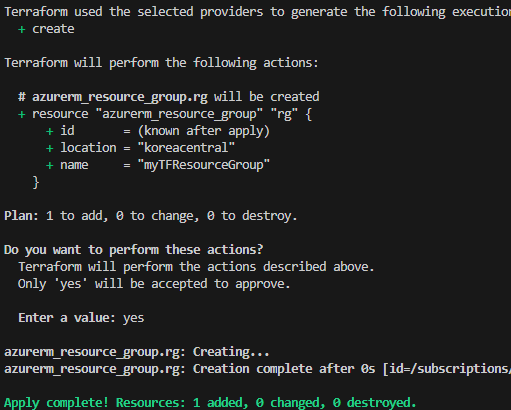
- Terraform 실행
- terraform init
terraform apply
- 결과 확인
진짜 RBAC 생성하는 데 생긴 오류 처리하는데 엄청 오래 걸렸다. (chatgpt는 신이다.)

Comments