[Home-K8S] #22 FluxCD 계층과 분리 / 다중 클러스터 리소스 공유와 설정 분리
FluxCD - yaml 앞서 fluxcd 를 이용해서 helm chart 를 구성했습니다. 그 외에 일반적인 yaml 파일을
![[Home-K8S] #17 n8n - FluxCD로 Helm upgrade 자동화 (w.Slack) (2) event workflow](/content/images/2025/09/------1-2.png)
slack 에서 버튼을 조작하는 등의 이벤트를 받기 위해 n8n webhook trigger node를 생성해 줍니다.
webhook url 을 복사해서 api.slack.com 의 bot -> Interactivity & Shortcuts (Features) 의 Request URL 에 붙여넣습니다.
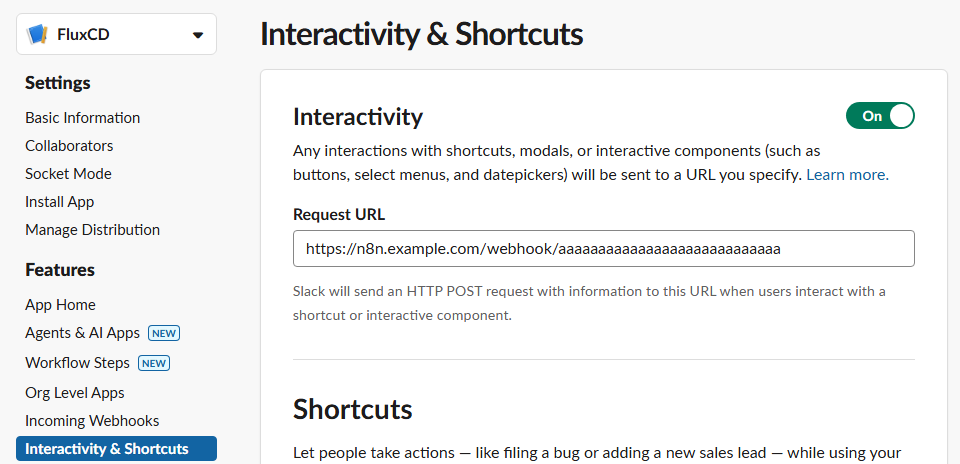
처음에는 test url 을 사용하는 것이 편하겠죠.
이제 모든 이벤트가 이 url 로 보내지게 됩니다.
(시간을 바꾸는 것도 event 로 들어갑니다. )
처음 테스트를 진행할 때에는 특정 시간이 아닌 즉시 적용으로 진행했습니다.
(적용 / 롤백 / 취소 )
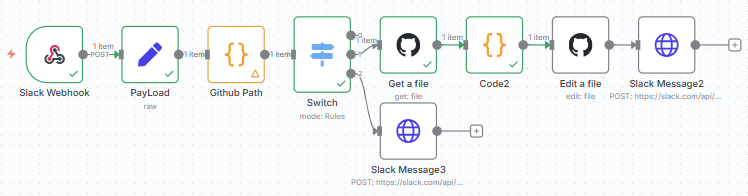
n8n 에서 github Get a file 을 진행하면 파일로 떨어집니다.
file 사용법으로 해메다가 역시 chatgpt 가 해결해 주었습니다.
// GitHub node에서 받은 파일
const githubData = $input.first();

// 1. base64 content 디코딩
const base64Content = githubData.json.content;
const decodedContent = Buffer.from(base64Content, 'base64').toString('utf-8');

// 2. target version 설정
const targetVersion = $('Github Path').first().json['target Version']

const metadataNamePattern = /metadata:\s*\n\s+name:\s*([^\n]+)/;
const nameMatch = decodedContent.match(metadataNamePattern);
const metadataName = nameMatch ? nameMatch[1].trim() : null;

// 현재 버전 찾기
const chartVersionPattern = /(chart:\s*\n\s+spec:\s*\n(?:\s+[^:]+:[^\n]*\n)*?\s+version:\s*)"([^"]+)"/;
const chartMatch = decodedContent.match(chartVersionPattern);
const previousVersion = chartMatch ? chartMatch[2] : null;

// 버전 변경
const modifiedContent = decodedContent.replace(chartVersionPattern, `$1"${targetVersion}"`);

const values = $('PayLoad').first().json.state.values;

const timeObjectKey = values ? Object.keys(values)[0] : undefined;

const inputTime = values?.[timeObjectKey]?.settime?.selected_time;

let targetTimeFormatted = null;

if (inputTime) {
  const [hour, minute] = inputTime.split(':').map(Number);
  const now = $now;
  const today = $now.set({ hour, minute, second: 0 });
  const targetTime = now > today ? today.plus({ days: 1 }) : today;

  // 포맷된 시간 문자열을 변수에 할당합니다.
  targetTimeFormatted = targetTime.toFormat('yyyy-MM-dd HH:mm:ss');
}
// 5. 결과 출력
return {
  "content": modifiedContent,
  "name": metadataName,
  "update time": targetTimeFormatted,
  "previous version": previousVersion,
  "target version": targetVersion
};
저 혼자는 어떻게 사용하든 상관없지만, 업그레이드 시간을 정해주고 싶었습니다.
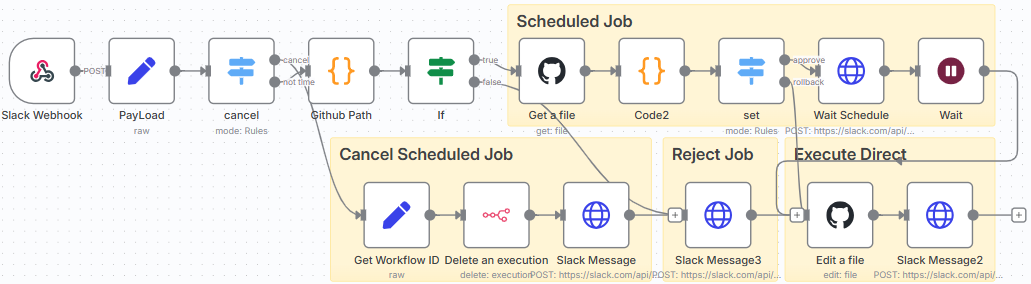
그래서 Approve 시간을 넣어주었더니 분기가 더 생기고 신경써야 할 부분이 늘었습니다.
(승인 / 승인 후 대기 / 대기 중 취소 / 취소 / 롤백 )
업그레이드 시간을 정해줬으니 그 동안 기다려야겠죠.
업그레이드 전까지 메시지를 바꿔주고 기다려 줍니다.
n8n 의 workflow 는 전부 병렬로 이루어 지기에 wait node 를 사용해도 상관 없습니다.

업그레이드를 기다리면서 취소할 수 있는 방법을 제공해야 합니다.
기존의 업그레이드 과정을 삭제하고, 다시 메시지를 바꿔줍니다.
위에서 말했듯 workflow는 병렬적이기에 기존의 workflow를 건드리기 위해 workflow ID 를 사용해야 합니다.
취소 버튼에 해당 workflow id 를 같이 정보를 보내 줍니다.
workflow id: {{ $execution.id }}id 를 기반으로 workflow 를 삭제해 줍니다.

취소 하고 나서 롤백이 가능하게 할까 하다가 불필요할 것 같아서 그냥 취소 했습니다.

롤백의 경우 즉시 적용이 가능하게 했습니다. 그리고 롤백된 이후에도 시간 선택 없이 즉시 업그레이드 가능하게 진행하였습니다.
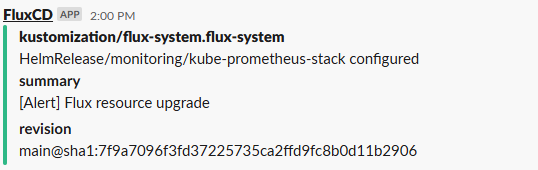
결과확인은 FluxCD의 hemRelease 작동여부로 판단합니다. 이것도 slack 으로 알람을 설정해 놓아서 성공/실패로 연락이 오게 됩니다.
역시 뭔가 직접 만들어 놓은 게 작동하면 마음이 편안해지고 만족감이 생깁니다.
Comments