[Home-K8S] #22 FluxCD 계층과 분리 / 다중 클러스터 리소스 공유와 설정 분리
FluxCD - yaml 앞서 fluxcd 를 이용해서 helm chart 를 구성했습니다. 그 외에 일반적인 yaml 파일을
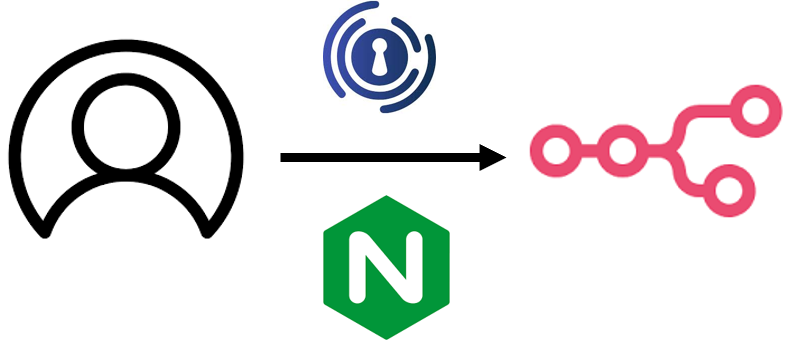
n8n을 Nginx와 연동해 자동 로그인(Single Sign-On) 환경을 구축하는 방법을 상세히 안내합니다. 이메일 기반 인증, EXTERNAL_HOOK 활용, Authelia 연동, 실전 환경 변수 및 모듈 설치 팁까지 셀프 호스팅 n8n 자동 로그인 실전 가이드.
현재 n8n 버전 : 1.88.0
n8n은 기본적으로 공유 Workflow를 제공하지 않습니다. 셀프 호스팅으로 직접 구성해도 마찬가지 입니다. 그래도 아예 방법이 없는 것은 아니죠.
Workflow를 공유하는 가장 간단한 방법은 계정을 공유하는 것입니다. 공유용 계정을 새로 만들어서 공유를 하는 것도 하나의 방법이고, 그냥 계정을 공유할 수도 있죠.
근데 매번 이메일을 치고 들어가는 것이 귀찮아요. 소셜 로그인이나, 간단한 로그인으로 SSO를 진행하는 방법을 구성하고 싶었어요.
계정을 공유하지 않고 각자의 로그인으로 공유된 계정에 접속하는 것을 찾아서 구성할 수 있었습니다.
기본적으로 n8n은 들어오는 모든 요청/접근을 처리하는 EXTERNAL_HOOK 을 만들 수 있습니다.
아래 js 파일을 n8n pod 에 넣어주면 됩니다.
const { dirname, resolve } = require('path')
const { issueCookie } = require(resolve(dirname(require.resolve('n8n')), 'auth/jwt'))
const ignoreAuthRegexp = /^\/(assets|healthz|webhook|rest\/oauth2-credential)/

module.exports = {
  n8n: {
    ready: [
      async function ({ app }, config) {
        const router = app._router || app.router;
        const routerStack = router?.stack || app.stack;
        const cookieParserIndex = routerStack.findIndex(layer =>
          layer.handle?.name === 'cookieParser'
        );
        if (cookieParserIndex === -1) {
          const middlewareList = routerStack.map(l => l.handle?.name || l.name);
          throw new Error('cookieParser 미들웨어 누락');
        }
        const authMiddleware = async (req, res, next) => {
          try {
            if (ignoreAuthRegexp.test(req.path)) return next();
            if (!config.get('userManagement.isInstanceOwnerSetUp', false)) return next();
            if (req.cookies?.['n8n-auth']) return next();
            if (!process.env.N8N_FORWARD_AUTH_HEADER) return next();

            const email = req.headers[process.env.N8N_FORWARD_AUTH_HEADER.toLowerCase()];
            if (!email) return next();

            const user = await this.dbCollections.User.findOneBy({ email });
            if (!user) {
              console.error(`사용자 미등록: ${email}`);
              return res.status(401).json({
                code: 'AUTH_USER_NOT_FOUND',
                message: 'Authelia 인증 성공했으나 n8n 사용자 없음'
              });
            }
            issueCookie(res, user);
            next();
          } catch (error) {
            console.error('인증 미들웨어 오류:', error);
            next(error);
          }
        };
        router.insertMiddleware = router.insertMiddleware || function(index,middleware){
          routerStack.splice(index,0,{
            handle: middleware,
            name: middleware.name || 'anonymous',
            params: {},
            path: '/',
            keys: [],
            regexp: /^\/.*$/,
            match: function(path) {
              return this.regexp.test(path);
            },
            handleRequest: function(req,res,next) {
              this.handle(req,res,next);
            }
          })
        }

        router.insertMiddleware(cookieParserIndex + 1,authMiddleware)
      },
    ],
  },
}
hooks.js
저는 "/home/node/.n8n/hooks.js" 경로로 넣어주었습니다.
해당 경로를 n8n의 환경변수에 넣어주면 됩니다.
containers:
- name: n8n
  image: n8nio/n8n:latest
  ports:
  - containerPort: 5678
  env:
  - name: EXTERNAL_HOOK_FILES
    value: "/home/node/.n8n/hooks.js"
  - name: N8N_FORWARD_AUTH_HEADER
    value: "Remote-Email"
  - name: N8N_EXPRESS_TRUST_PROXY
    value: "true"
  - name: N8N_PROXY_HOPS
    value: "2"
    value: "true"
  - name: N8N_SESSION_COOKIE_SAME_SITE
    value: "Lax"
    # ...
  volumeMounts:
  - name: hooks
    mountPath: /home/node/.n8n/hooks.js
    subPath: hooks.js
  - name: data
    mountPath: /home/node/.n8n
volumes:
- name: hooks
  configMap:
    name: n8n-hooks
- name: data
  persistentVolumeClaim:
    claimName: n8n-data-pvc
env for hook.js
인증 시 header에 email을 보고 email이 있으면 인증을 진행하는 js 코드입니다.
이제 인증 시 email을 전달하는 설정을 ingress에서 작성해야 합니다.
metadata:
  name: n8n
  namespace: n8n
  annotations:
    nginx.ingress.kubernetes.io/proxy-buffering: "off"
    kubernetes.io/tls-acme: "true"
    nginx.ingress.kubernetes.io/auth-url: "http://authelia.authelia.svc.cluster.local:9091/api/verify"
    nginx.ingress.kubernetes.io/auth-signin: "https://authelia.dogring.kr/"
    nginx.ingress.kubernetes.io/proxy-set-headers: |
      'X-Real-IP $remote_addr'
      'X-Forwarded-For $proxy_add_x_forwarded_for'
      'X-Forwarded-Proto $scheme'
      'X-Forwarded-Host $host'
    nginx.ingress.kubernetes.io/auth-response-headers: "Remote-Email"
ingress for n8n header
마지막 auth-response-headers로 Email을 사용하여 인증을 진행합니다.
그리고 이 Email 정보는 인증을 하는(auth-url) Authelia에 존재합니다.
users_database.yaml 유저 정보의 email에 n8n에서 생성한 user의 email로 설정하면 됩니다. email을 이용하여 인증을 진행하기 때문에 Authelia 말고도 설정만 가능하다면 가능할 것 같습니다.
사실 이 과정을 구성하면서 오류가 발생했습니다. 오류 내용은 hook에 필요한 node.js 모듈이 없다는 오류였습니다.
dockerFile로 이용해서 express를 포함한 n8n 이미지를 다시 생성해서 사용하면 되겠지만, 이상한 오기가 생겨 initcontainers로 모듈을 다운받아서 넣는 형식으로 교체했습니다.
initContainers:
- name: install-express
  image: node:20.19.0
  command:
    - sh
    - -c
    - |
      mkdir -p /custom_node_modules
      npm config set prefix /custom_node_modules/.npm-global
      npm install --global \
        [email protected] \
        [email protected] \
        [email protected] \
        [email protected] \
        [email protected] \
        @oclif/[email protected] \
        @n8n/[email protected] \
        [email protected] \
        [email protected]
      chmod -R 777 /custom_node_modules
  volumeMounts:
  - name: node-modules
    mountPath: /custom_node_modules
containers:
- name: n8n
  image: n8nio/n8n:latest
  ports:
  - containerPort: 5678
  env:
  - name: N8N_ENFORCE_SETTINGS_FILE_PERMISSIONS
    value: "true"
  - name: NODE_PATH
    value: /usr/local/lib/node_modules/n8n/node_modules:/custom_node_modules/.npm-global/lib/node_modules
  - name: NPM_CONFIG_PREFIX
    value: /custom_node_modules/.npm-global
    # ...
  volumeMounts:
  - name: hooks
    mountPath: /home/node/.n8n/hooks.js
    subPath: hooks.js
  - name: data
    mountPath: /home/node/.n8n
  - name: node-modules
    mountPath: /custom_node_modules
volumes:
- name: hooks
  configMap:
    name: n8n-hooks
- name: data
  persistentVolumeClaim:
    claimName: n8n-data-pvc
- name: node-modules
  emptyDir: {}
설치하는 모듈이 많은 이유는 node-modules 폴더를 마운트 하다보니 있던 모듈도 날아가 버려서;;;
그래서 그냥 전부 설치 했습니다. (일이 더 많아진 느낌...)
Comments